
How to get mobile data on a trip to Shanghai, Hangzhou, Suzhou and beyond: home roaming, travel eSIMs and local SIM cards compared, what works on Chinese networks, and a setup checklist.
In China your phone is your wallet, your map, your translator and often your ticket. A reliable data connection from the moment you land makes everything else easier, from paying for a taxi at Pudong Airport to booking a temple visit in Hangzhou.
There is one extra thing to plan for. Many services you use at home, including Google, WhatsApp and Instagram, do not work on Chinese local networks. How you connect decides whether they work for you.
Quick Answer
| Option | Best for | Google, WhatsApp, Instagram | Chinese phone number |
|---|---|---|---|
| Home roaming | Short trips, if your plan includes China at a fair price | Usually work | No |
| Travel eSIM bought before you fly | Most visitors on trips of 1–3 weeks | Usually work if the plan routes data outside mainland China | No |
| Local SIM card | Long stays, or if you need a Chinese number | Do not work | Yes |
| Hotel or café Wi-Fi | Backup only | Do not work | No |
For most of our guests, a travel eSIM installed before departure is the simplest choice.
Why Your Apps May Not Work in China
Mainland China restricts access to many foreign websites and apps. On a Chinese SIM card or on local Wi-Fi, you generally cannot use Google services (Search, Maps, Gmail), WhatsApp, Instagram, Facebook, YouTube or X.
International roaming works differently. Your data is usually routed back through your home operator or an overseas gateway, so these services typically keep working. Many travel eSIMs use the same kind of roaming arrangement. That is the main reason visitors choose roaming or an eSIM over a local SIM.
Chinese apps such as WeChat, Alipay, Amap (Gaode), DiDi and Trip.com work on every connection type.
Option 1: Roaming on Your Home Plan
Check with your mobile operator whether mainland China is included in your roaming package and what it costs. Some plans include China at no extra cost; others charge high daily fees.
Advantages: no setup, your usual number, and SMS codes from banks and apps arrive as normal.
Disadvantages: can be expensive, and speeds depend on your operator’s agreement with Chinese networks.
Option 2: A Travel eSIM (Recommended for Most Visitors)
A travel eSIM is a digital data plan you buy online and install on your phone before you travel. It connects to a Chinese network such as China Mobile or China Unicom as a roaming user.
Check your phone first
- Your phone must support eSIM. Most recent iPhones, Google Pixels and Samsung Galaxy models do.
- Your phone must be unlocked, meaning it is not tied to a single operator.
- Phones bought in mainland China, Hong Kong or Macau may not support eSIM even on recent models.
Choose a plan carefully
- App access: Check that the provider says Google, WhatsApp and other apps work in mainland China, or that data is routed through Hong Kong or another overseas gateway. Not every China eSIM does this, so read the plan details and recent reviews.
- Data allowance: Maps, payment apps, translation and photo uploads add up. For a week of active sightseeing, 10–20 GB is a comfortable range for most travellers; heavy video users need more.
- Hotspot: If you want to share data with a laptop or a travel partner, confirm hotspot sharing is allowed.
- Validity: Match the plan to your full trip, including days in Hong Kong if you are combining destinations.
How to install and activate
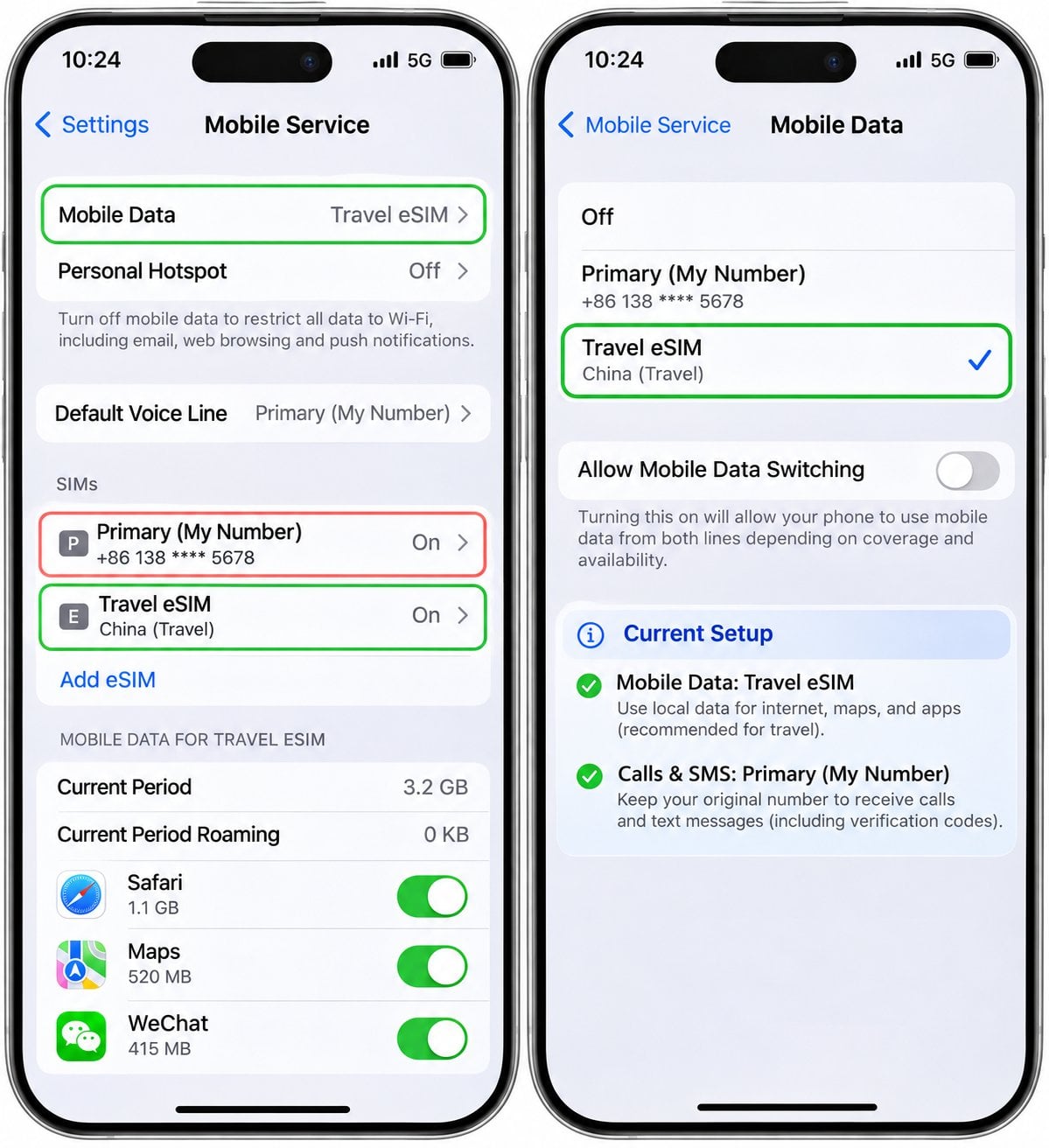
- Buy the eSIM a few days before you travel and install it at home on Wi-Fi, by scanning the QR code or using the provider’s app.
- Label the new line clearly in your phone settings, for example “China data”.
- Keep your home SIM switched on as a second line for calls and SMS, but turn off data roaming on that line to avoid charges.
- When you land, switch on the eSIM line, select it for mobile data and turn on data roaming for that line.
- Test that a site like Google loads. If it does not, restart the phone and check the provider’s setup notes.
Option 3: A Local Chinese SIM Card
A Chinese SIM gives you a local +86 number and usually cheaper data. It suits longer stays, business travellers, and anyone who needs a Chinese number for local services.
How to buy one
- Go to an official store of China Mobile, China Unicom or China Telecom. Major international airports, including Shanghai Pudong, have counters for international visitors.
- Bring your original passport. Real-name registration is required by law, and a face scan is part of the process.
- Ask for a prepaid tourist or short-term plan with data.
What to know
- Google, WhatsApp, Instagram and similar apps will not work on a local SIM.
- Chinese mobile operators have started offering their own eSIMs, but at the time of writing these are not generally available to short-term visitors. Visitors use a physical SIM or a travel eSIM bought outside mainland China.
- You cannot simply buy a SIM at a convenience store; registration must be done in person.
Wi-Fi in Hotels, Cafés and Trains
Wi-Fi is widely available in hotels, cafés, airports and many restaurants in East China. It is a local connection, so the same app restrictions apply as on a Chinese SIM. Some public networks also ask for a Chinese phone number to log in. Treat Wi-Fi as a backup, not your main connection.
High-speed trains between Shanghai, Suzhou, Hangzhou and Huangshan generally have mobile coverage, but signal can drop in tunnels and hilly sections.
Coverage in East China
Mobile coverage is strong across Shanghai, Hangzhou, Suzhou, Nanjing and the water towns. On Huangshan Mountain and in rural areas around Huizhou villages and Jingdezhen, signal can be weaker in valleys and on some trails. Download offline maps and save key information before heading out.

Apps to Install Before You Fly
Some app stores in mainland China do not offer foreign apps, and downloads can be slow. Install and log in to these at home:
- Alipay and WeChat, with your card linked (see our guide to paying in China)
- Amap (Gaode) for detailed maps and public transport. Apple Maps also works well in China, as it uses local map data.
- DiDi for ride-hailing, or use it inside Alipay
- Trip.com or the 12306 railway app for train tickets
- A translation app with Chinese downloaded for offline use
- Your airline, bank and hotel apps, logged in before departure
Google Maps is often inaccurate in China even when it loads, so do not rely on it for walking or public transport directions.
Before-You-Fly Checklist
- Phone checked: unlocked and eSIM-compatible
- Travel eSIM bought and installed, or roaming confirmed with your operator
- Home SIM kept active for SMS codes from your bank and apps
- Alipay and WeChat installed and set up
- Offline maps and translation packs downloaded
- Hotel names and addresses saved in Chinese characters
- Screenshots of booking confirmations and train tickets
- A power bank, since you will use your phone constantly
Frequently Asked Questions
Does an eSIM work in China?
Yes. Travel eSIMs bought outside mainland China connect to Chinese networks as roaming users. Most phones from the last few years support eSIM, but check your model and make sure it is unlocked.
Will WhatsApp and Google work in China?
Not on a Chinese SIM card or local Wi-Fi. They usually work on international roaming and on travel eSIMs that route data outside mainland China. Check the plan details before you buy.
Should I get a Chinese SIM card?
Only if you are staying for a long time or need a local number. For a holiday of one to three weeks, a travel eSIM is simpler and keeps your usual apps working.
Can I buy a SIM card at Shanghai Pudong Airport?
Yes. Mobile operators have counters at the airport. Bring your original passport for real-name registration.
How much data do I need for a week in China?
Most active sightseers use 10–20 GB in a week. Maps, payments, translation and uploading photos and videos use the most.
Will I still get SMS codes from my bank?
Yes, if you keep your home SIM active as a second line with roaming SMS enabled. This matters for card verification in Alipay and WeChat Pay.
Travel With Local Support
On our tours, your guide can help with connections, bookings and translation along the way. If you are planning a trip, our Plan My Trip page is the best place to start, and our Shanghai airport transfers guide covers your first hour after landing.
Prepared by: Discover East China Tours
Last updated: 11 November 2026
Network rules, provider routing and plan details change. Check your eSIM provider’s current information and your phone’s compatibility before you travel.