
Daily life in China runs on a phone: paying for lunch, hailing a taxi, booking a temple visit, reading a menu. Most of it happens inside a few apps that may be unfamiliar, and some of the apps you use at home either do not work on Chinese networks or give poor results.
This guide lists what to install for a trip to Shanghai, Hangzhou and East China, what each app does, and the order to set them up. Do all of it at home: downloads and verification are much easier before you land.
Quick Answer
| Need | App | Set up before you fly? |
|---|---|---|
| Paying | Alipay (first), WeChat (backup) | Yes, with your card linked and verified |
| Messaging and mini-programmes | Yes | |
| Maps and directions | Amap (Gaode) or Apple Maps | Yes, with offline areas saved |
| Taxis and ride-hailing | DiDi, inside Alipay or as its own app | Yes |
| Trains | Railway 12306 or a booking site | Yes, register early |
| Translation | A translation app with offline Chinese | Yes, download the language pack |
| Internet access for your usual apps | A travel eSIM or roaming plan | Yes |
1. Alipay: Payments, Transport, Bookings
Alipay is the one app to set up first. It handles QR payments almost everywhere, metro and bus ride codes, DiDi rides, bike sharing and many attraction bookings, all inside one app with an English interface.
Link your foreign Visa or Mastercard and complete passport verification before you travel. Our guide to paying in China walks through the steps and the fees.
Mini-programmes: many services live inside Alipay as "mini-programmes", small apps you open by searching their name. Transport ride codes, DiDi and bike sharing are all found this way.
2. WeChat: Messaging, Payments, Reservations
WeChat is China's messaging app, and WeChat Pay works as a backup to Alipay. It also hosts official accounts and mini-programmes for museums, temples and attractions, which is where many reservations happen. Search a venue's Chinese name to find its official mini-programme.
New accounts sometimes need verification by an existing WeChat user, so register several days ahead. Your guide or hotel can also add you on WeChat, which is the easiest way to stay in touch during your trip.
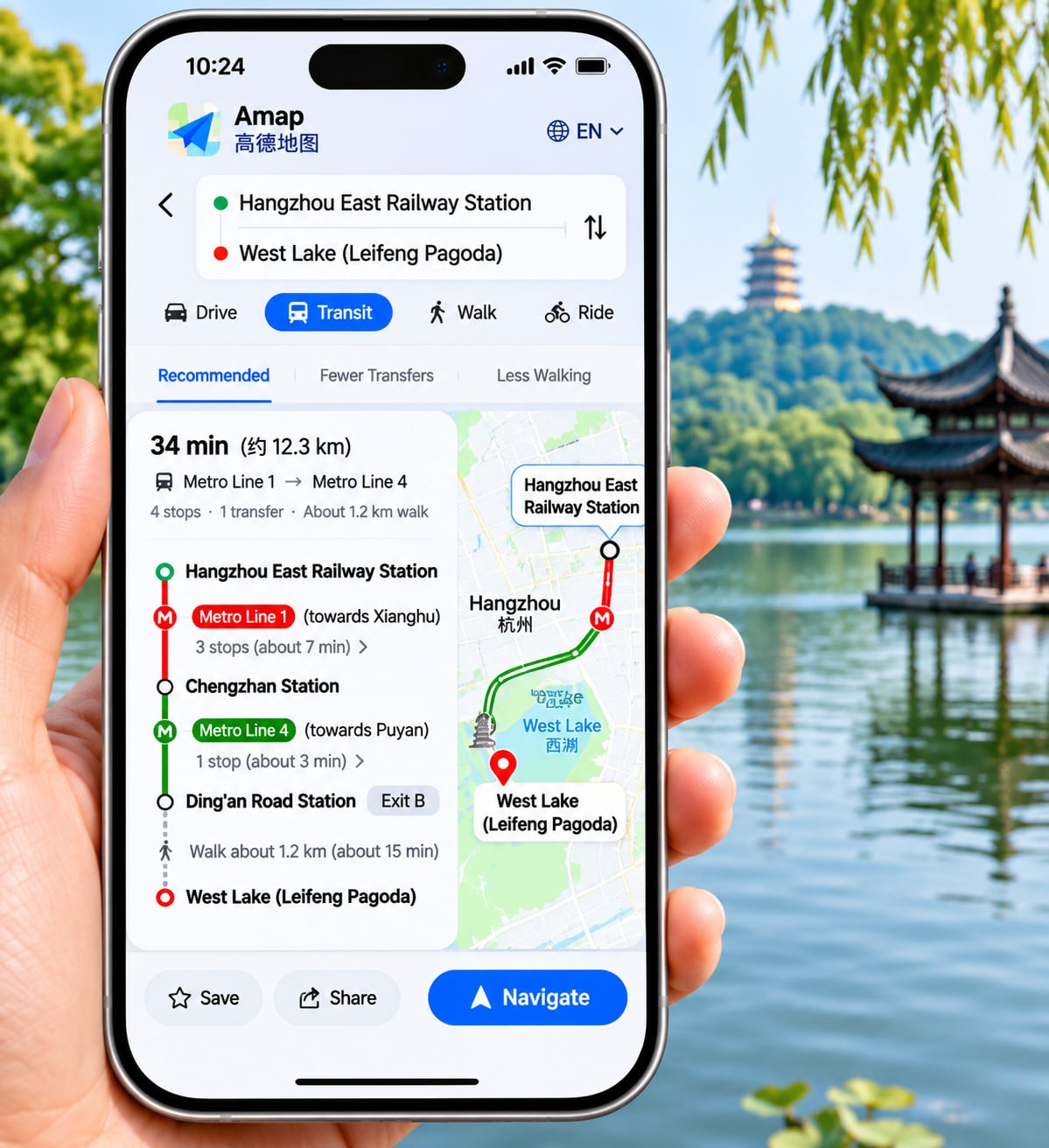
3. Maps: Amap or Apple Maps, Not Google Maps
Google Maps is unreliable in mainland China even when it loads: positions can be offset and public transport data is thin. Use one of these instead:
- Amap (高德地图): the most detailed maps and the best public transport routing. The international version has an English interface, and you can search in English for major places.
- Apple Maps: works well in China on iPhones because it uses local map data, with English labels and transit directions.
Save your hotel and key destinations before you go, and keep each hotel's name and address in Chinese characters to show taxi drivers.
4. DiDi: Taxis and Ride-Hailing
DiDi is China's main ride-hailing service. The easiest way to use it is the DiDi mini-programme inside Alipay, which works in English and charges your linked card. You can also install the DiDi app and register with your home number.
Enter destinations in English or pinyin, or paste the Chinese address. Drivers rarely speak English, so the app's built-in translated messages are useful. Street taxis still work too, paid by QR code or cash.
5. Trains: Railway 12306 or a Booking Site
High-speed trains between Shanghai, Suzhou, Hangzhou and Huangshan are booked on the official 12306 app or website, which has an English version and accepts foreign passports and foreign cards. Identity verification can take time, so register before you travel. Licensed booking sites such as Trip.com sell the same tickets with a service fee and English support. Our guide to buying train tickets in China covers the details.
6. Translation
Install a translation app and download Chinese for offline use before you fly. Camera translation is the feature you will use most: point it at a menu, a sign or a ticket machine. Conversation mode helps at hotel desks and shops. Translation apps that rely on Google servers will not work on local networks without a roaming connection, so test yours on arrival and keep a second option. Many Chinese translation apps also offer English interfaces.
7. Hotel, Airline and Booking Apps
Log in to your airline, hotel and booking-site apps at home. Trip.com is useful in China for hotels, trains and some attraction tickets, with English customer service.
8. A Travel eSIM or Roaming Plan
This is not an app, but it decides whether your usual apps work. On a Chinese SIM or hotel Wi-Fi, Google services, WhatsApp, Instagram and similar are blocked. On international roaming or a travel eSIM that routes data outside mainland China, they usually work. Our China eSIM and internet guide explains the options.
Setup Order: A Week Before You Fly
- Arrange mobile data: a travel eSIM installed, or roaming confirmed.
- Install Alipay, link your card, verify your passport, make a small test payment.
- Install WeChat, register, and set up WeChat Pay as a backup.
- Install a map app and save your hotels and key places.
- Register on 12306 or book trains through a booking site.
- Install a translation app and download the offline Chinese pack.
- Open DiDi inside Alipay once so it is ready.
- Save every hotel's Chinese name and address, and screenshots of all bookings.
Apps You Can Skip
- VPN apps: a travel eSIM or roaming usually gives you your usual apps without one, and installing a VPN after arrival is difficult.
- Chinese food-delivery and lifestyle apps: useful for residents, but most need a Chinese number and are not needed for a short trip.
- Local bus apps: the Alipay transport code already covers buses and metros in East China cities.
Frequently Asked Questions
What apps do I need for China as a tourist?
Alipay for payments and transport, WeChat for messaging and bookings, a map app such as Amap or Apple Maps, DiDi for taxis, 12306 or a booking site for trains, and a translation app with offline Chinese.
Does Google Maps work in China?
Not well. It is blocked on local networks and inaccurate even on roaming. Use Amap or Apple Maps.
Do I need WeChat if I have Alipay?
Alipay covers most payments and transport. WeChat is worth having for messaging with your guide or hotel, as a payment backup, and because many museum and temple reservations run through WeChat mini-programmes.
Can I download these apps in China?
App stores in mainland China may not show foreign apps, and downloads can be slow. Install everything at home.
Do I need a Chinese phone number?
No. Alipay, WeChat, DiDi and 12306 all accept foreign numbers for visitors.
Travel With Someone Who Knows the Apps
On our tours, your guide sets up the practical side on day one, from ride codes to reservations, so you can spend your time looking up rather than at a screen. Start planning on our Plan My Trip page.
Prepared by: Discover East China Tours
Last updated: 11 November 2026
App features, interfaces and verification steps change often. Check each app's current setup process before you travel.